LinkedIn market mapping, graded against your role description
Map the market from your own LinkedIn or LinkedIn Recruiter account. Everyone who fits the role is graded A, B or C with the evidence and ranked, in STARselect and in an Excel download.
How LinkedIn market mapping works in STARselect
- From your own LinkedIn account. Searches run on the account you connect: standard LinkedIn or LinkedIn Recruiter (including Lite). A standard account reaches your 1st, 2nd and 3rd-degree network, with filters for location, current job title, industry, past company and connections. Recruiter covers all of LinkedIn, and “Check how many LinkedIn has” shows about how many people match before you start.
- Graded A, B or C and ranked. STARselect runs the searches from the role description. Up to 1,000 people a search are graded A, B or C against the role, with the evidence, and ranked. A key says what each grade means for the role, and a repeat run skips anyone already on the map.
- Checking, then confirmed. A grade from someone's short LinkedIn search summary shows as Checking until their full profile or CV confirms or changes it, re-scored free. Full profiles are read a set number a day, which you choose in Settings, and a daily summary shows how many were confirmed and who moved up.
- Someone missed in the search? Press “Someone missed in the search?” to add a person from their LinkedIn profile link or their CV. They're graded like everyone else, with the reason the search missed them. For anyone on the map, “Find more like them” searches again from their job title, employers and key terms, using their CV when there is one.
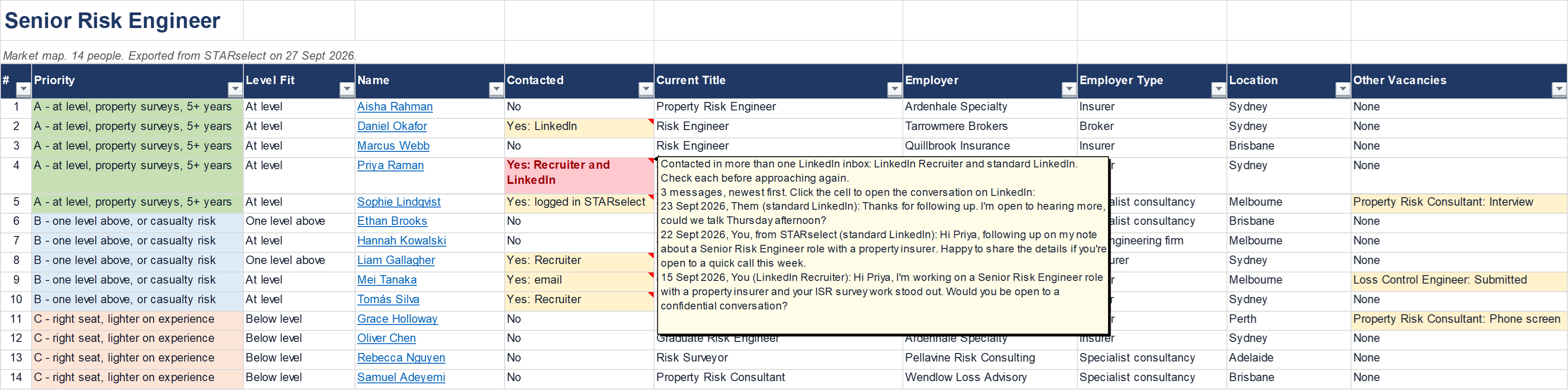
- Who's already been contacted. Before you reach out, see whether each person has already been contacted, and when: in your own standard LinkedIn, Recruiter and company page inboxes, in emails picked up by Watch my inbox, and in messages anyone on your team sent from STARselect. Anyone contacted from more than one LinkedIn inbox is flagged.
- Your LinkedIn and Recruiter messages, in sync. Tick “Keep STARselect in sync with my LinkedIn and Recruiter messages” in Settings, and your messages with people already in STARselect come back to Messages automatically, starting with your last 90 days. Only you see them. With Recruiter, add people to your project's pipeline, and they move to Contacted and Replied as you message them.
The Excel download
Every market map you download shows, next to each name, whether they've already been contacted, checked again as you download. Choose the grades to include and leave out anyone marked Not a fit. Point at a name to see their LinkedIn profile, laid out like LinkedIn, so you can review multiple profiles quickly, in the same place.
Try STARselect free for 30 days.
Create your STARselect account and your trial starts straight away, with nothing to pay and no card details needed. Your trial includes 1,000 LinkedIn profiles added to market maps.
STARselect is not affiliated with, endorsed by or sponsored by LinkedIn. LinkedIn is a trade mark of LinkedIn Corporation.